Thursday, March 26, 2009
ElderGadget Blog: Useful Tech and Tools
Today I came across the ElderGadget Blog when I was searching for technology that might be helpful to my father, who recently spent the last few weeks in an intensive care unit.
Here are a few things I found on the blog, including what I found when I followed a link to the bindependent website:
Smart Table: A Broadband Communication System for the Elderly
ID Studiolab, Delft University of Technology, NL
"The smart system is aimed to prevent possible social isolation between elderly people and their social contacts. It consists of the Smart Table and the Smart Messenger, which provide easy and intuitive way for elderly people to benefit from the advantage of communication technology and improve the satisfaction of their social activities."
"During the design research, a working prototype is made and evaluated by a user test. The Smart Table offers people a way to use broadband communication without the need for a computer. The television will be used for video communication (web-cam) and the table as user-interface. On the table contact persons can be selected and images and video can be shared. The elderly person can capture images that will be shared instantly. The contact person can select images from his or her computer, which will be projected on the table of the elderly person". (TU Delft - Faculty Industrial Design Engineering - Master Design for Interaction - Project Interactive Technology Design - Vincent Steurs & Juin-Yi Huang)
Demy Kitchen Safe Touchscreen Reader
Photo Watch
Clarity-C900: Amplified Big Button Cell Phone
911 Guardian: "Tiny wearable speakerphone"
Extra Large TV Remote Control


SmartShopper: Electronic grocery-list maker

Bierley's ColorMouse Video Magnifier

RELATED
Live from CES - Dakim's Brain Fitness Keeps Seniors Sharp

Previous post: Ubiquitous Computing - Grandpa and grandkids use a webcam and Skype across the miles
YouTube Vlogger: Geriatric1927
Geriatric Gripes and Grumbles


Tuesday, March 17, 2009
Eyeborg: WebCam in a Prosthetic Eye; Prostetic Finger with USB Drive
The Eyeborg Project takes Microsoft's SenseCam concept to the next level.
From the Eyeborg Project Website:
"Take a one eyed film maker, an unemployed engineer, and a vision for something that's never been done before and you have yourself the EyeBorg Project. Rob Spence and Kosta Grammatis are trying to make history by embedding a video camera and a transmitter in a prosthetic eye. That eye is going in Robs eye socket, and will record the world from a perspective that's never been seen before."
Jimmy Fallon Spoofs the Eyeborg Project from eyeborg on Vimeo. Jimmy insists that he received an Eyeborg when he had Lasix surgery to improve his eyesight.
CONCEPT DRAWING OF THE EYEBORG BY JOENIS NORAC
RELATED:
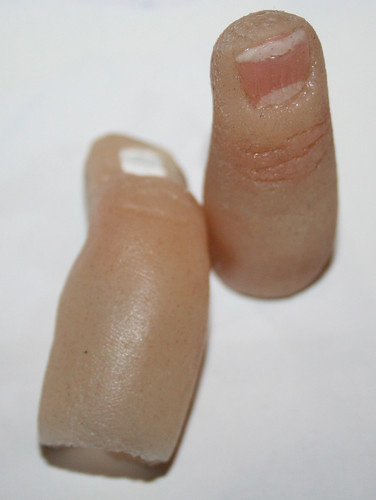
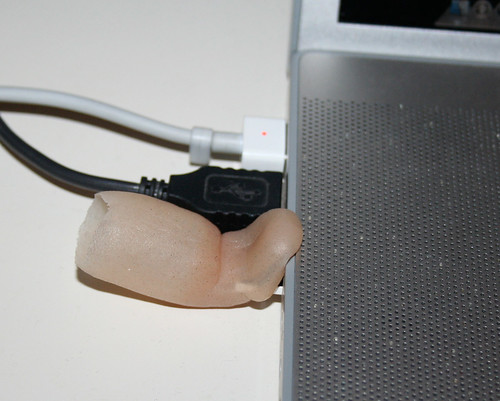
Finn Creates USB Finger Drive
Jerry Jalava, a computer programmer who lost his finger in an accident, created a prosthetic finger that contains a USB drive:


UPDATE: Microsoft's SenseCam Aids Memory Recall
From the
"SenseCam is a wearable digital camera that is designed to take photographs passively, without user intervention, while it is being worn. Unlike a regular digital camera or a cameraphone, SenseCam does not have a viewfinder or a display that can be used to frame photos. Instead, it is fitted with a wide-angle (fish-eye) lens that maximizes its field-of-view. This ensures that nearly everything in the wearer’s view is captured by the camera, which is important because a regular wearable camera would likely produce many uninteresting images."
New study proves that Microsoft's sensory innovation aids memory recall
Technology Review Article
Images from Microsoft Research:
SenseCam Videos
Research and Publications


