Thursday, December 3, 2009
Interactive Digital Bus Shelters
Touch Screen Interaction at a Digital Bus Shelter, Via Daily DOOH
(Link to the video of the digital bus shelters displaying a recent LG promotion on interactive touch screens)


Tuesday, March 31, 2009
Everyware Health Care: Mobile Patient Communicator- an interactive touch screen for patient education
Via the Cloud Computing Journal:
New Mobile Patient Communicator Gives Patients and Interactive Education Tool and Boosts Nurse Productivity
"“Nurses spend a lot of time simply escorting patients from the waiting room to the exam room. We have found that the MPC can effectively room patients, while creating more value-added time for nurses to assume additional clinical tasks,” said Kelvin Buncum, president of International Medical Solutions. "
"“A compelling attribute of the MPC is that it increases nurse and support staff productivity, since it frees up caregivers to devote more of their valuable time to patient evaluations,” noted Buncum, who with his partner Jaime Mitchell, developed the MPC in conjunction with a family practice physician who saw the need to improve his medical support staff‟s productivity to meet growing demand and patients‟ knowledge of their chronic disease."
"During their wait time patients can view educational videos in private to learn about critical matters involving their acute illness, chronic condition and procedures. The user-friendly MPC delivers subject matter specific to the patient‟s stage of care, treatment regimen, rehabilitation, care plan and disease management."
"Serving as a personal health tutor and trainer, the MPC can perform pre- and post-instruction tests, scoring patients on their disease knowledge and retention. Healthcare providers can also grant users access to their clinical Web portal and patient applications via the MPC, providing significant utility over stationary kiosks."
The International Medical Solutions company offers a selection of touch-screen mobile patient communicator devices that would have come in handy during my father's longer-than-expected stay in an intensive care unit:
7 Inch MPC
10-Inch MPC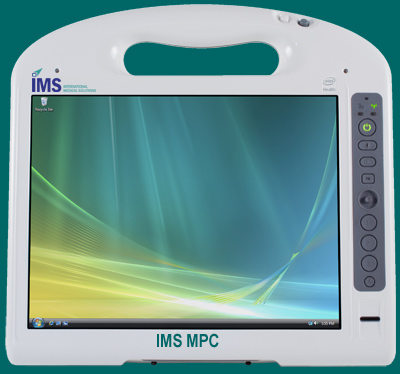
12 Inch MPC
11-inch Rugged MPC
Applications:
Whitepaper (pdf)
Tuesday, September 16, 2008
Airport Technology: Interactive Information Touch-Screens at the Edinburgh Airport (Scotland)

Seven of these wall-mounted interactive displays were installed at the Edinburgh airport in ScotlandThis interactive kiosk doesn't look cutting edge, as has the look of a pleasant, familiar ATM. It looks easy-to-use, for both the adult and child. This is important for rushed travelers in airports. by Scrimsign Microelectronics, LTD.
According to the company's website, options include a sunlight readable LDC, a thermal ticket or A4 printer, choice of cases, and a rugged keyboard.
I'm still looking for interactive displays in airports and other public spaces that are easy-to-use, yet also possess the "Wow!" factor.
Related:
Edinburgh Airport Buys Pods to Drive Public Transport Use
"Interactive access to Traveline Scotland from the arrivals hall is seen as a key element in encouraging a modal shift. By presenting passengers with practical public transport options the service is expected to influence both visitors’ choice of transport mode and destination, helping tourists to explore the historic city." -Transport Briefing
Monday, September 8, 2008
Multi-touch iPhone Game: Skateboarding with Your Fingers....
I came across this videoclip from Illusion Labs today and thought I'd share it:
Touch Grind
Saturday, August 30, 2008
Link to "Internet of Surfaces" Photo Examples
Here is a link to a wide assortment of photos that provide examples of what an "Internet of Surfaces" might look like:
INTERNET OF SURFACES: Photo Examples of Screens of All Sizes
Some of the photos are from my team projects. Other photos are from the Microsoft Surface website, NUI-Group members, and odds and ends from other sources.
Saturday, August 23, 2008
Useful, Usable Interaction Information Displays at the Sydney Airport?!
Most of what I've encountered in the way of interactive information displays in airports and other public spaces has been underpar, as several of my previous posts have documented. Maybe there is hope in Australia...
Although I haven't flown to Australia, I'm hoping that the latest installation of information displays will meet expectations.

Here are the details, from the NextWindow website:
"...To inform travelers about the progress of the upgrades, SACL has placed NextWindow 32” interactive touch screens throughout the complex. The touch screens provide virtual tours using animation software. "
"Passengers and airport staff have commented on the ease of use of the system and the immediate availability of relevant information at the touch of a finger."
"SACL chose integration partner Honeycom Solutions to bring the touch-enabled displays to reality. Honeycom used LCD monitors from LG Electronics in conjunction with NextWindow’s 2403 Touch Panel overlays. HoneyCom were supplied with the touch technology by NextWindow's Australian Distributor, Image Design Technology (IDT)."
The Bombay Sapphire display, also located at the Sydney airport, is visually appealing:

If you've encountered these displays at the Sydney airport, leave a comment and share your experience.
Saturday, August 16, 2008
Microsoft Surface's Hotel Concierge Application: Let's see this deployed in classrooms, museums, libraries, welcome centers, convention halls..
Take a look at the following video to see how Microsoft Surface's Hotel Concierge application plays out at a Sheraton hotel:
Of course, surface-like applications would have to become much more affordable in order to become ubiquitous in our schools, libraries, airports, and other public spaces.
(Cross-posted on the Interactive Multimedia Technology blog.)
Saturday, June 28, 2008
Why not adopt the Google User Experience Team's design principles for off-the-desktop digital interactions?
If you haven't noticed yet, interactive urban (and suburban) screens of all shapes and sizes are found outside the home and workplace, in places we've come to expect, and in unexpected places. Our cell phones have morphed into web browsers, with larger, higher resolution screens.
The web and the real world have become intertwined.
But often, it is not pretty.*
It is as if all of the blocked pop-ups, banner ads, and fast-forwarded commercials escaped, and found new homes on the screens we find staring at us in airports, malls, arenas, and big-box store aisles!
Is it possible for user experience principles to enhance our digital lives beyond our laptops and desktops?
A recent post on the Putting People First blog outlines some great advice from the Google User Experience Team that holds true for off-the-desktop applications, including multi-touch displays, digital signage, kiosks, mobile devices, and anything under the umbrella of DOO- digital out-of-home:
"The Google User Experience team aims to create designs that are useful, fast, simple, engaging, innovative, universal, profitable, beautiful, trustworthy, and personable. Achieving a harmonious balance of these ten principles is a constant challenge. A product that gets the balance right is “Googley” – and will satisfy and delight people all over the world."
The ten principles that contribute to a “Google User Experience” are:
1. Focus on people – their lives, their work, their dreams
2. Every millisecond counts
3. Simplicity is powerful
4. Engage beginners and attract experts
5. Dare to innovate
6. Design for the world
7. Plan for today’s and tomorrow’s business
8. Delight the eye without distracting the mind
9. Be worthy of people’s trust
10. Add a human touch
*Previous posts highlighting usability problems - and other things not pretty - related to off-the-desktop user experience:
Off-the-desktop musings about future interactions: User experience, user-driven design, Universal Usability, Airports, and the "Internet of Things"
Usability/Interaction Hall of Shame
Not-so-useful Information Displays in a University Building
Technology-Supported Shopping and Entertainment: User Experience at Ballantyne Village - "A" for Concept, "D" for Touch-screen Usability
Thursday, May 29, 2008
Multi-touch from Fingertapps

If you've seen some of the NextWindow demos I've posted previously on this blog, you might be interested in knowing that some of what you've seen was developed by Fingertapps. Here is some information from the website:
"Fingertapps supports various multi-touch screen technologies including optical / blog tracking products such as Next Window as well as capacitive touch technologies such as the N-Trig screen used in the Dell XT."
"Fingertapps is an advanced software platform that makes it easy to quickly develop engaging multi-touch applications. Your applications can combine images, 3D models and video content along with natural touch screen gestures to create an unparalleled user experience."
An advantage of Fingertapps is that it allows users to build their own applications, using a declarative scripting language.
Fingertapps Videos:
The third video clip is demonstrated on a Dell Latitude XT tablet, using the N-Trig capacitive touch.
Fingertapps blog
Fingertapps is responsible for the educational software, UMAJIN CREATIVE, which was designed for digital storytelling. It works on touch screens and interactive whiteboards.
Wednesday, May 28, 2008
Cross Post: More Muti-touch, Windows 7 demo on a Dell Laptop
Video: Multi-Touch in Windows 7
Via SoapBox, Greenbush Labsand CNET
If you are new to this blog and would like to learn more about multi-touch interaction and technology, enter a keyword in the search box.
Also take a look at the Interactive Multimedia Technology blog.
For multi-touch DYI, check out the NUI Group!
Cross posted on




