Friday, May 3, 2013
Linkfest (for your tech-reading pleasure)
Here's an update of links to posts from my Interactive Multimedia Technology blog. Similar content can be found on my Pinterest boards.

OpenPilot: A Next-Gen Open Source Autopilot Approach to Aerial Videography
XBox Kinect in the OR: Kinect supports gesture interaction with 3D imaging of the patient, while operating.
Telemedicine in Schools: Promoting Health (and Mental Health)
InteractiveTV Today (ITVT): Links to information and updates about CES 2013, via Tracy Swedlow.
Gesture Markup Language (GML) for Natural User Interaction and Interfaces
CCRMA Summer Workshops: Stanford's Center for Computer Research in Music and Acoustics
Disney Research: Touche, Touch and Gesture Sensing
AirHarp for Leap Motion, a Responsive Musical Natural User Interface
Tips for Apps and the Web: Designing for Teens, Part I
Part II: Websites and Apps for Teens and Education
Designing for Touch & Gesture: Tips for Apps and the Web (Updated)
Affinity+: Semi-Structured Brainstorming on Large Displays, from Pacific Northwest National Library
Call for Papers: Human-Computer Interaction and Learning Science
Update: What's New for Kinect? Fusion, real-time 3D digitizing, design considerations, and more.
Interactive MaKey MaKey: "An Invention Kit for Everyone" - Video Preview
Google Glass and Kids- BYOGG? Quick links to MIT Tech Review Post - and more
Leap Motion: My Dev Kit Arrived - Now What? Thoughts About "NUI" Child-Computer Tech Interaction
Google Earth and Leap Motion
Quick Post/Videos: Evolving Soft Robots (Cornell's Creative Machines Lab); Leap Motion + Google Earth Experiment (PO-MO)
Little Digits Counting and Early Math App, by Cowly Owl- Chris O'Shea
Interesting Videos I Almost Missed (Future/Emerging/Creative Tech)
The Uncanny Valley is Here! Activision's real-time character demo is chilling real.
What happens when a 2-year-old wakes up to the sound of the Google Map Lady? "I CAN'T turn left right now!"
Pixel Press: Draw, create, play and share games, without code, now on Kickstarter.


Friday, June 17, 2011
LINKS AND UPDATES: Emerging and interactive technologies/apps, related posts
- I haven't been able to keep up this blog due to a very busy schedule. The good news is that I've continued to keep up with my Interactive Multimedia Technology blog - below is a list of links to posts spanning across the past few months that I cut and pasted into this post. Enjoy!
- An Internet of Old Things as an Augmented Memory S...
- In case you missed this: Microsoft Releases Kinec...
- Summer Blogging Plans - Lots of interesting update...
- A few interesting tech links from Experienta/Putti...
- Quick Links: On-line interactive science resource...
- Interactive Multimedia: Music, Videos and Ads -Cho...
- Fun, weird, and a little scary: "Baaa" and "Cows&...
- Top 10 All-Time Posts on the Interactive Multimedi...
- NEWSEUM, a highly interactive museum in D.C. with ...
- Quick Link: Florida's Technology Integration Matr...
- The Digging Into Data Challenge and List of Online...
- StoryVisit: Read and enjoy web-based stories whil...
- Quick link: Edublogger Bill Ferriter's posts abou...
- Display Week 2011 Recap: (Society for Information ...
- CHI 2011, Bill Buxton, and the Buxton Collection: ...
- humanaquarium at CHI 2011
- Johannes Schoening's CHI 2011 Highlights, Linkfest...
- Exploring Social Media Literacies in Teaching and ...
- Update from #CHI 2011 - much more to come.
- CHI 2011! - Today's Highlights from the ACM CHI Co...
- Allison Druin's Workshop Keynote: "Mining the Ima...
- At CHI 2011 - workshop starts soon!
- Futurecasting and Science Fiction at Intel: Video ...
- CHI 2011 Workshop Program and Related Links: UI Te...
- TEDTalk: Carlo Ratti, of MIT's SENSEable City Lab ...
- Play with Dynamic Views of my Blog: Snapshot, Mos...
Calming Technologies Research, Stanford University
- Take a short break to enjoy a performance by the KAIST Mobile Phone Orchestra
- "Visualize This": Nathan Yau's (FlowingData) book...
- Are girls allowed in Google's tool shop? Just wondering
- CALL FOR PAPERS: Touch the Web 2011 2nd Internatio...
- Links - Web of Things: Touch the Web 2011; Web Pa...
- Virtual History of Rome for the iPad, Created with...
- Program- CHI 2011 Child Computer Interaction: 2nd ...
- SIFTEO, the next-gen Siftables! (Tangible User I...
- The New Media Consortium Needs Examples of K-12 Te...
- A few links to start the week: AR for libraries, ...
- Multitouch and Gesture News (Part I) : NUITEQ Upda...
- Bill Gerba's Words of Wisdom about Digital Media C...
- iPad: A couple of good articles about the enchanti...
- Regional Multimedia News: Blind Squirrel Digital ...
- SUPERMOON: Video from NASA, Links
- Cute TV Commercial! Intel Gesture Recognition Tech...
- Words of Wisdom from Ira David Socal: "Writing wit...
- Could your child have a Geminoid for a teacher som...
- Designing For Children: Good article by Catalina N...
- Monday Musing and Meanderings: Interesting videos ...
- Post from TechPsych blog: How about some iPad 2 a...
- Window Shopping in the Web Outside: Interactive Wi...
- New DOOH: TouchTunes Touch Jukebox and TouchTuneM...
- Video: Gesture Interactive Window Display at a Re...
- Video: Kinect at the Supermarket - Supporting "Sa...
- More Eyetracking! Lenova's Laptop Prototype Incor...
- Game Accessibility Example: Control Sims 3 with yo...
Tuesday, December 29, 2009
The Post-WIMP Conversation: Some Thoughts about Conceptualizing NUI, Part I
This post was updated and moved to the Interactive Multimedia Technology blog:
The Post-WIMP Conversation: Some Thoughts About Conceptualizing NUI, Part I
Thursday, October 8, 2009
A Nokia n900 and an Interactive Urban Screen at the 2009 onedotzero Festival
Interactive Urban Screen
The interactive urban screen installation, also known as the 2009 onedotzero identity, was made interactive by a Nokia n900 mobile phone, as shown in the pictures and video clips below.
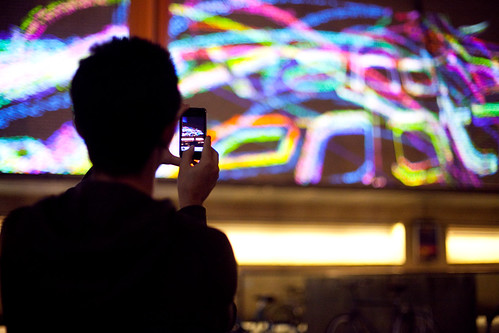
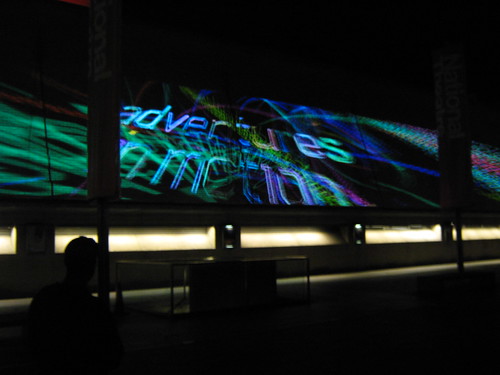
onedotzero interactive identity powered by Nokia N900 from onedotzero on Vimeo.
Nokia n900 onedotzero Installation- Behind the Scenes
Onedotzero - Watch the interaction with an urban screen with a Nokia n900 (Story behind the scenes story).
RELATED
N900 to appear in London next week!
(JBC, Nokia Conversations, 9/4/009)
According to the article, the application for the installation was developed by digital artists/computational designers Karsten Schmidt and Gary Birkett. (I think the ad agency Wieden + Kennedy London was also involved with this project, since Nokia is their client.)
About onedotzero
"Onedotzero is a contemporary, digital arts organisation with a remit to promote innovation across all forms of moving image and motion arts, activities encompass public events, artist + content development, publishing projects, education, production, creative direction, and related consultancy services ... onedotzero was conceived at the start of the desktop digital revolution in the mid-1990s out of a desire to explore moving image across single screen, interactive and live audio-visual work. today, onedotzero remains committed to providing a home for visionary moving image experimentation and contemporary creative collisions."
Saturday, September 26, 2009
Natural User Interface News: Bamboo Wacom multi-touch gesture tablet; SnowFlake Suite and PresTop multi-touch kiosks
Cross-post:
Wacom Tablets Get Multi-Touch, Gestures
(Charlie Sorrel, Wired, 9/24/09)
"For the tech-curious, the new tablets have 512 pressure levels in the pen tip and the active area of the tablet is 5.8 x 3.6 inches, and all lose the in-pack mouse (for obvious reasons). The Touch and the Pen models are both $70, and the Pen & Touch is $100. Also, if you were thinking of buying Photoshop Elements 7 for the same price, get a tablet instead — Elements comes in the box."

Official Wacom Video
"Bamboo Touch is new type of computer input device by Wacom that lets you navigate and perform commands like zoom, scroll, rotate and more with a series of simple finger taps and hand gestures. Bamboo Touch brings Multi-Touch capability to your Mac or PC"
Video from a Wacom user:
A nice alternative to a mouse. I'm going to get one for my laptop!
Multi-touch Kiosks!
Press release: Dutch touchscreen supplier PresTop partners with Natural User Interface (NUITEQ)


RELATED
I couldn't find any video clips of PresTop's multi-touch interaction. From what I can tell, PresTop multi-touch screens will be using SnowFlake Suite from Natural User Interface Technogies AB.
How-to:SnowFlake Suite Flash multi-touch Interactable component (NUIversity)
Without a single line of code, you can do quite a bit with Snowflake Suite
"This video covers how to make a rotatable and scalable image. The beauty about this is, that we have developed a Flash mouse input simulator, so that there is no need for multi-touch hardware in order to develop your applications. Simply simulate multiple mouse inputs for multi-touch.This project is still in alpha phase and a download will become available with the next release of Snowflake Suite 1.7 for the NextWindow platform and camera based multi-touch solutions."
Below is a video of single-touch interaction for PresTop, from Omnivision:
PresTop PresTop offers interactive hardware and software solutions that can be used indoors as well as in outdoor environments.

Monday, September 21, 2009
Mixed Reality at the Nokia Research Center: Creating an interfaced and connected world!
The people at Nokia Research Center are working hard at creating an interfaced world. The video provides a few examples of what we might expect in the near-to-mid future:
YouTube Description:
"This concept allows to you to experience immersion and effortless navigation in new ways. New types of interactions involving near-to-eye displays, gaze direction tracking, 3D audio, 3D video, gesture and touch. Through these new types of social linkages people will be connected in innovative ways between the physical and digital worlds."
Nokia's future-looking projects look have many features that support the concept of world-as-interface. Mobile phones will be transformed into mobile magic lenses "which lets users look through the mobile’s display at a world that has been supplemented with information about the objects that it sees." The web will blend with reality through Nokia Image Space, and allow people to upload pictures and related information that can be accessed and explored in a variety of ways, through mobile phones or traditional browsers. Near-to-Eye Displays will be used to augment mobile interfaces, and incorporate gaze tracking technologies.
The physical world will blend with the digital: "Through the use of haptic feedback, and other technologies just being invented, our interaction with the digital world and with each other will become more integrated and tangible. Being able to “feel” when a friend is close by through a shirt that hugs you is one example. Tapping a friend on the shoulder from miles away. Having your shoes vibrate if you take a wrong turn, or walk into a bad area of town".
RELATED
Nokia Research Center
Mobile Mixed Reality (pdf)
Nokia Image Space
Nokia Point and Find
Metaverse Roadmap Project
Metaverse Roadmap Overview (pdf)
Developing Gaze Tracker for Diffractive-Optics-Enabled Near-to-Eye Displays
Hyperlinking Reality via Phones - MIT Technology Review
Virtual Reality Continuum
Monday, January 19, 2009
Touch Screen Interaction in Public Spaces: Room for Improvement if "Every Surface is to be a Computer"!
With Win7's "multi-touch" capabilities, Bill Gate's statement that every surface will be a computer might come true, but from what I can see, we have a long way to go before we get it right!
One of the concerns I have about "touch" screen interaction in public spaces is that not much thought is given to the environmental factors surrounding the system. The system that is tested for the first time after installation might work just fine, but not when it is put to use under a variety of conditions or situations.
EXAMPLES (I've recycled a few of these from previous posts.)


Below is a shot of my husband, trying to see what is on the screen. This photo shows exactly what the screen looked like at the time:

The next picture tells it all. You can see that there is some sort of alphabet on the right side of the screen, but the reflection of my husband is easier to see. We couldn't figure this one out.

The following clip demonstrates how environmental concerns, such as wind and "sideways" rain, can make an interactive display at a shopping center difficult to use. During this clip, you can hear me muttering about the difficulties I had interacting with the information on the touch-screen display. It is possible that the system wasn't working well because of the exposure to the elements.
In my opinion, an interactive wayfinding application should run on a larger display and support two or more people, since many hospital visitors often run in pairs or small groups.




